Code Standards and Styles
General
Keep data separate from business logic as much as possible
Use comments everywhere in your code
Don't assume the next guy will understand what you are doing
Keep methods easy to read and understand: 🧠 Cognitive Load Developer's Handbook
People can only remember a few facts at a time
Split "heavy" IF statements into multiple variables
Methods should only do one thing
Use proper naming: PWI U: The Importance of Proper Naming in Programming
Never simply comment out code: either remove it entirely or add a todo comment explaining why it is commented out with instructions on when/why to uncomment it
Declare class constants at the beginning of the file
Avoid using magic numbers and strings
Use constants or variables to give them meaningful names
This article has a great explanation of why magic numbers are bad and how to avoid them
C#
Include XML documentation for all the following:
Public methods and properties
Extension methods
Global properties
Use public properties instead of public fields (see Encapsulation)
Use the default naming conventions and formatting set up in Rider
for existing projects, make sure that Rider is set to auto-detect naming styles
Resolve all IDE warnings in Rider
JavaScript
Use Google's style guide for JavaScript, except for hard line wraps at 100 characters instead of the standard 80.
To Configure JavaScript Code Style
Open Settings (CTRLALTS)
Navigate to Editor > Code Style > JavaScript
Select Set from... on the right hand side and choose the Google JavaScript Style Guide
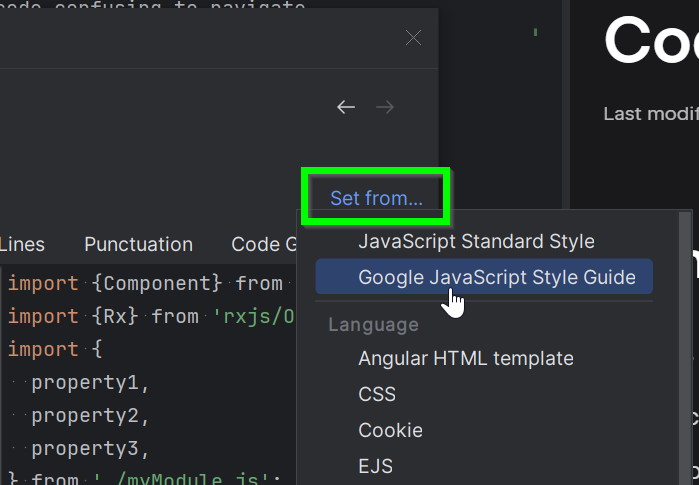
Under the Wrapping and Braces tab, set Hard wrap at: to 100
Apply the changes
Dart
Use Effective Dart as a style guide.
Additional standards for Dart and Flutter development are outlined in our Flutter Development Standards article.