Flutter Architecture Standards
Components
Since we are using the MVVM structure (see Flutter Development Standards), we separate our code into individual components or categories that each play a distinct role.
Component Definitions
Core Components
- View
The UI layer that displays data and handles user interaction. Each view has a corresponding view model.
- View Model
The intermediary between the view and the data layers. Processes user input, manages state, and exposes data to the view.
- Repository
Caches data models locally and exposes methods to fetch and write data models. Also provides a space for business logic such as data validation, preventing duplicates, and advanced searching beyond simple service data queries.
- Data Model
Represents the structure of the data retrieved from repositories.
- Service
Handles communication with external systems, such as REST APIs or Firebase.
Optional Components
- Controller
Manage global application state and configurations, such as routing and app-wide settings.
- Use Case
Encapsulates specific business logic or operations that can be reused across different view models.
- Domain Model
Represents business entities and rules, often used in conjunction with use cases.
Component Interactions
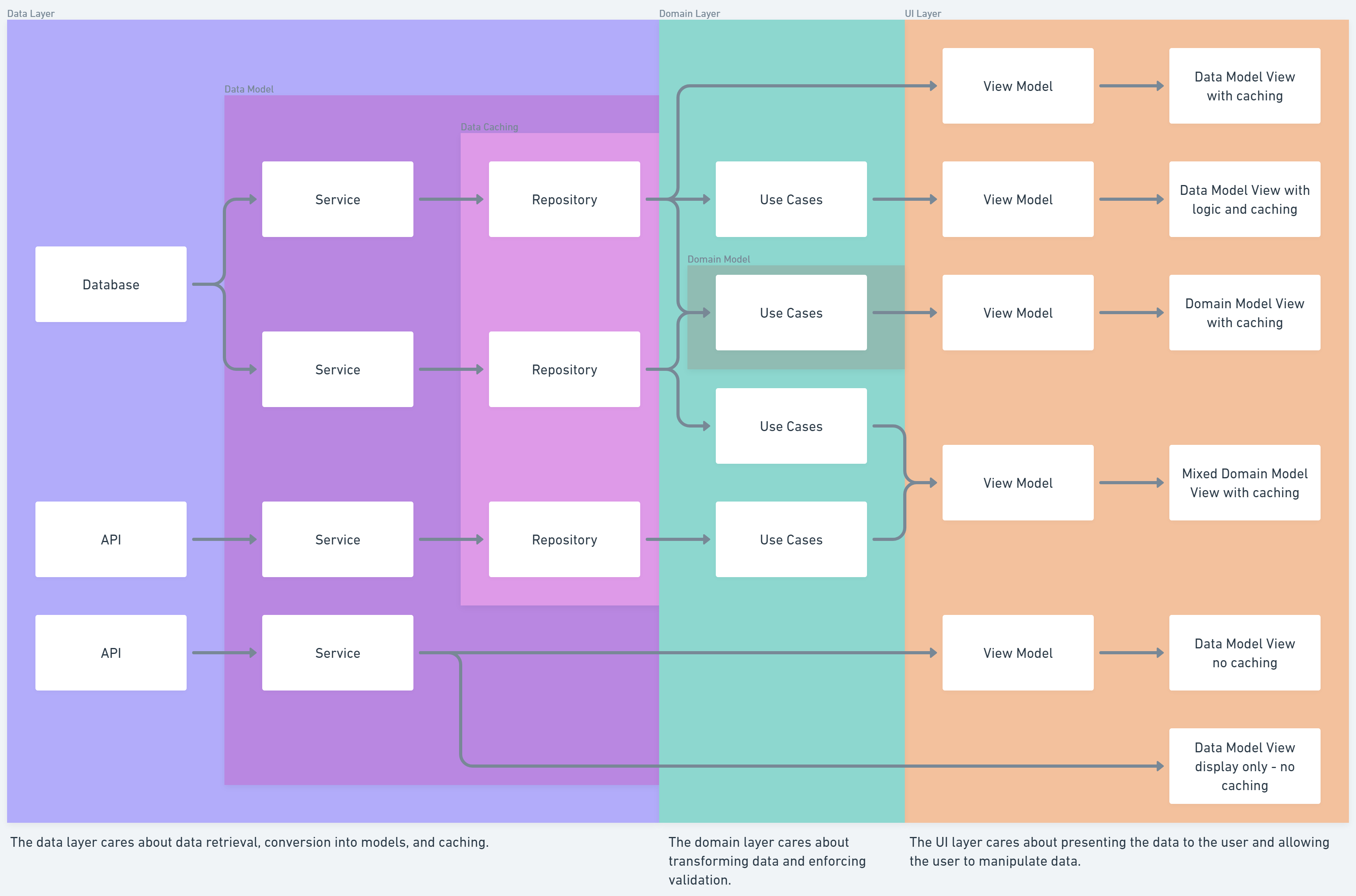
This chart illustrates how the components interact with each other. Arrows indicate the direction of data flow from database to the user.
Repository Structure
Expected repository structure (i.e., where to place these components) is defined in Flutter Development Standards: Repository Structure.
Deciding Where to Write Code Functionality
When deciding where to write new code, consider the following guidelines:
1. External Data Access
Never access any data (e.g., Firestore, API calls) without using a Service.
2. Allowed Consumption Paths
Think of the standard components as "layers" in the architecture, with the data source at the "bottom" and the views at the "top".
Data Flow Rules:
Data flows in both directions, but may not "skip" layers that are present.
Component Knowledge Rules:
Components may only know information about the layers directly below them.
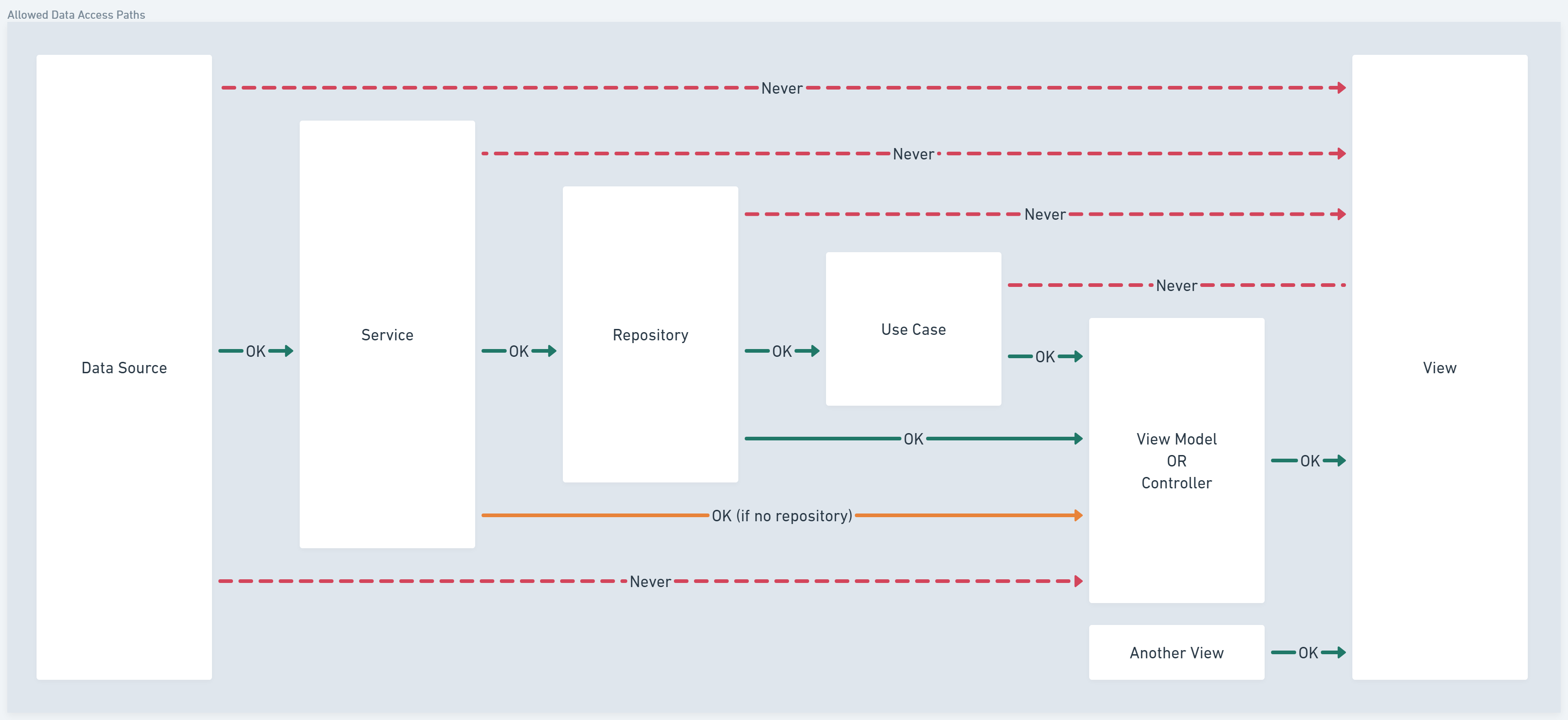
Services → usually consumed by Repositories and Controllers, can be consumed by View Models directly when data caching and validation is not needed.
Repositories → only consumed by View Models or Use Cases
Repositories may be injected into Use Cases using dependency injection.
Use cases using injected repositories should always provide a way to supply repositories in the constructor, so they can be tested with mock repositories.
Use Cases → only consumed by View Models
View Models → only consumed by Views
3. Business Logic Rules
Repositories, Models, Services, and Views → no business logic
View Models, Controllers, and Use Cases → may contain business logic
Data Model Extensions → may contain small business logic implemented as getter functions (e.g.,
isAdmin,isDeveloper,isSoldThisYear).
4. Domain Model Rules
Domain models may only be created by Use Cases.
Utils may process domain models, but may never create them.
5. Use Case Organization
Group Use Cases by their related Domain Model. Naming should reflect the relationship if possible.
There should only be one use case per domain model.
Use abstract use cases only when working with abstract domain models. Avoid overly complex abstractions.
6. Utility Rules
Utils must be:
Static
Fully independent
Fully testable
7. Views + Model Access Rules
Non-stateless views (views with a View Model) should avoid directly accessing data from models to prevent tight coupling.
When to Break These Rules
On rare occasions, these rules may be broken. Whenever the rules are broken, code must be very thoroughly documented explaining the reason for the exception.